Why we chose Telegram over text messages.
It wasn’t to save a dollar. We picked Telegram because it does things a text blast simply can’t — two-way replies, one-tap serving confirmations, photos and buttons, and a bot that talks straight to your church data. And members connect in about two minutes.
Free to send · No per-message cost · Works on every phone
TimelyChurch Bot
bot
Today
You’re scheduled to serve 🙌
Sound — Sunday Worship Service
Sun, Jul 12 · 5:00 PM
Can you make it?
9:04 AM
✅ Yes, I’ll be there
9:05 AM · ✓✓
Got it — you’re confirmed. Your team leader can see it now. Thank you! 🙏
9:05 AM
Illustration of a TimelyChurch serving confirmation in Telegram.
An honest look at the two channels.
Plain SMS has one real strength: it’s already on every phone, with nothing to install. Everywhere else, Telegram does more — which is exactly why we built on it.
| Telegram (what we use) | Plain SMS / text blast | |
|---|---|---|
| Direction | Two-way Members reply, confirm serving, and ask questions right in the chat. |
One-way blast only — you send, and that’s where it ends. |
| Content | Rich by default Photos, files, buttons, formatted text and group channels. |
Plain text with tight character limits. |
| Cost to send | Free — no per-message cost Send unlimited messages to 10 members or 1,000. |
Per-text billing (Twilio-style) that tools typically pass on to the church. |
| Delivery | Instant push Doesn’t land in an SMS “spam / promotions” void. |
Can be filtered into a spam / promotions folder and go unseen. |
| Built-in bot | TimelyChurch bot Connects to each member’s account; leaders run /myteam, /openslots, /nudge in chat. |
No bot, no in-chat commands. |
| Member setup | Install the free Telegram app once, then one tap to connect. (The honest tradeoff.) | Nothing to install Already on every phone. |
Last reviewed: July 2026 — messaging features and costs change; verify current details on the providers’ own sites.
What you can do with the TimelyChurch Telegram bot.
The bot isn’t a mailing list. It talks directly to your church’s data — so a tap in the chat updates the real schedule, and a leader command pulls a live answer.
Two-way correspondence
Members don’t just receive — they reply. Ask a question, respond to a prayer request, or start a conversation, and it reaches the right people at your church. A broadcast channel becomes a genuine dialogue.
Serving confirmations — Yes / No / Snooze
When someone is scheduled, the bot sends the details with three inline buttons. One tap records their answer immediately in the team schedule. No forwarding, no “did you get my text?” — you can see who’s confirmed before Sunday.
Broadcast categories & digests
Announcements, events, sermons, prayer requests and more — each is its own toggle, so members get only what’s relevant. Set a daily or weekly digest and TimelyChurch assembles upcoming events and news and sends it on schedule, in your church’s local time.
Leader commands, right in the chat
Team leaders manage Sunday without opening a laptop:
/myteamSee your roster and who’s serving this week./openslotsSee unfilled positions and offer them to eligible teammates./nudgeSend a friendly reminder to anyone who hasn’t confirmed.
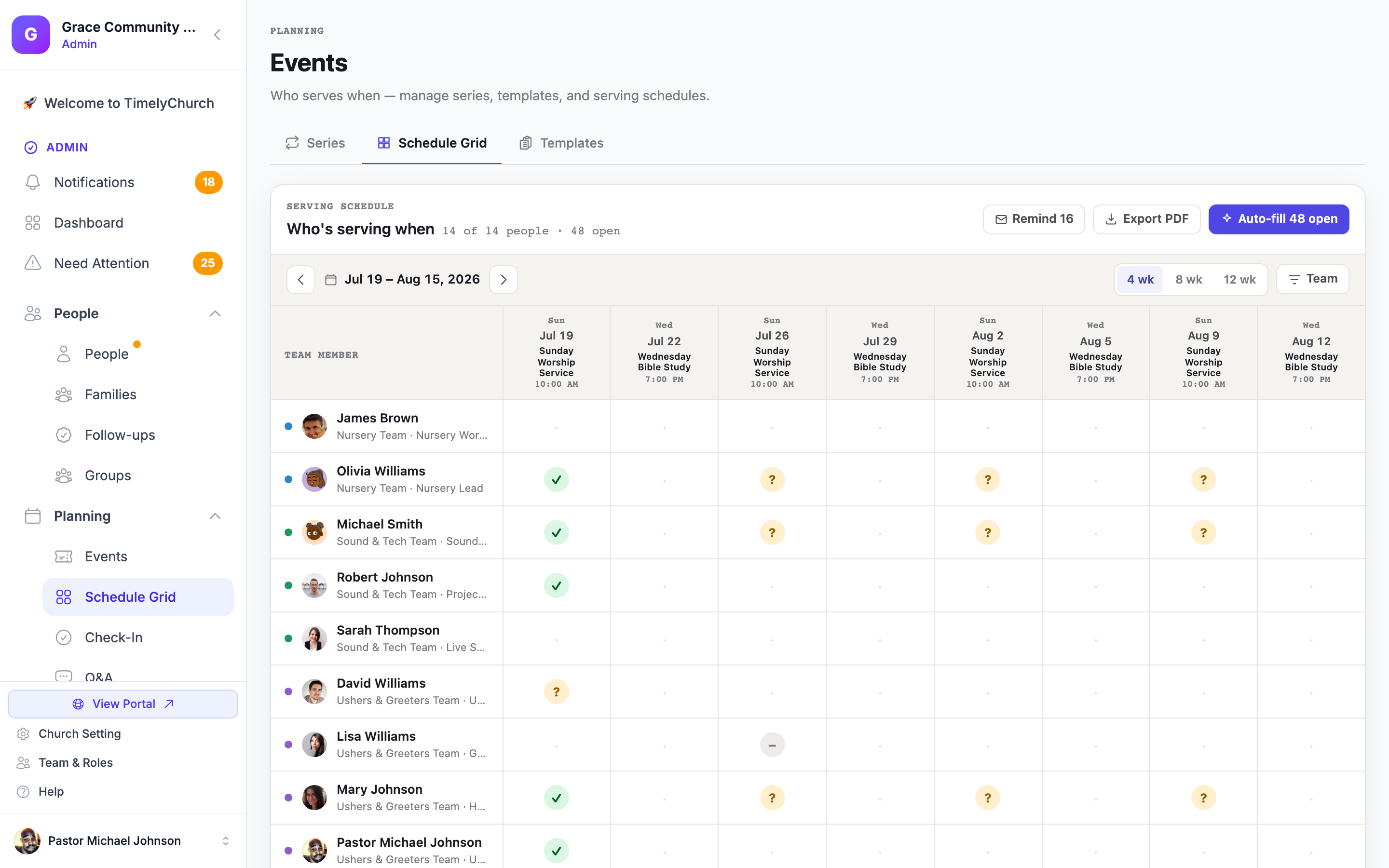
Every tap in Telegram lands right here — in your live serving schedule.
Get connected in about 2 minutes.
It sounds advanced — a bot linked to your account, in your language. It feels effortless. Here’s the whole thing, start to finish.
-
1
Install the free Telegram app
Grab Telegram on iPhone, Android, or desktop — it’s free and takes under a minute. If you already have it, you’re one step ahead.
Get Telegram -
2
Open your connect invite
Your church automatically sends each member a personal connect invite. Tap it — or scan the QR code, or search for the TimelyChurch bot inside Telegram. No phone numbers shared, no admin lookup.
-
3
Tap Start — you’re linked
One tap on Start ties your Telegram to your TimelyChurch profile — and the bot greets you in your language (English, Spanish, Russian, Portuguese, German, or Lithuanian). That’s it. Serving confirmations and the news you chose start arriving.
Auto-invited. The church sends the invite — no one goes hunting.
In your language. The bot speaks all five UI languages.
You’re in control. Disconnect anytime from your profile.
The honest part — and why it’s worth it.
We’ll say it plainly: members do need to install Telegram once. It’s free, it’s on iOS, Android, and desktop, and it takes under a minute — but it’s a step SMS doesn’t ask for. If your church truly needs plain text to reach every phone with zero member setup, that’s a real tradeoff to weigh.
For everyone else, that one small install unlocks two-way replies, one-tap serving confirmations, photos and buttons, leader commands, and no per-message cost — forever. That’s the trade we made on purpose, and it’s why Telegram is the heart of how TimelyChurch keeps a church connected.
“TimelyChurch was easy to set up, integrate with Telegram, and get my team up and running from day one. The TimelyChurch team is very receptive to feedback and constantly seek ways to improve their platform and the user experience.”
Ready to connect your church?
Start free and see how two-way Telegram messaging changes the Sunday scramble. Connecting your bot takes about 30 seconds; members link in about two minutes.
See plans & pricing