Back to All Features Smart Volunteer Management

Team Planning & Volunteer Scheduling

Stop spending hours on scheduling. Our intelligent system learns your team's preferences and automatically fills positions with the right people at the right time.

Smart Auto-Scheduling

Let Smart Scheduling Fill Your Roster

Our intelligent scheduling system considers availability, rotation history, preferences, and skills to automatically suggest the best person for each position. Review and approve with one click.

Availability-Aware

Only schedules volunteers who have marked themselves as available for that date.

Fair Rotation

Automatically distributes assignments evenly so no one gets burnt out.

Skill Matching

Matches qualified volunteers to positions based on their skills and training.

Conflict Detection

Automatically detects and warns about double-bookings and conflicts.

Auto-Schedule Suggestions
February 2, 2025 - Sunday Service
SM
Sarah Mitchell
Worship Leader
95%
Match Score
DK
David Kim
Lead Guitar
88%
Match Score
CL
Chris Lee
Drums
72%
Match Score
app.timelychurch.com/events/matrix
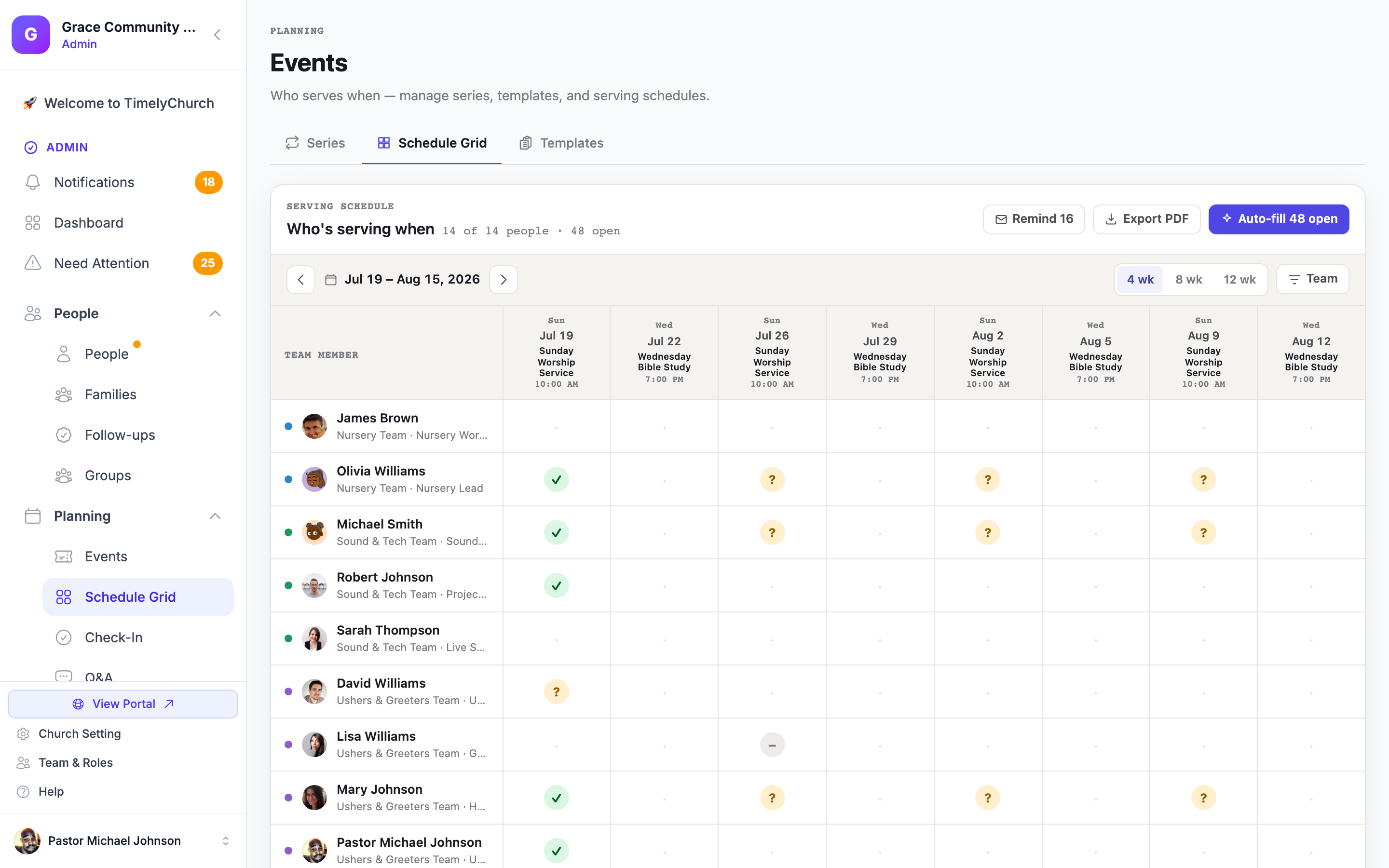
Volunteer schedule grid showing who is serving each week, with confirmed, pending, and declined statuses across Sunday services
Schedule Grid & Auto-Fill

See Every Week at a Glance — Then Fill It in One Click

The volunteer schedule grid lays out your entire roster week by week. Switch between 4, 8, or 12-week views to plan a month ahead or map out the whole quarter. Every open slot is visible at a glance — and one click on Auto-Fill closes them all.

4 / 8 / 12-Week Grid Views

Toggle between views to see the full picture — who is serving, which positions are empty, and how far ahead your roster is covered.

One-Click Auto-Fill with Fair Rotation

Auto-Fill places the right volunteer in each open slot using a fair-rotation algorithm — tracking who has served recently so the same people are never over-called and quieter members get their turn.

Export to PDF

Print or share a clean PDF of the complete schedule — handy for team leaders, bulletin inserts, or posting backstage.

Volunteers Confirm via Telegram

Once the schedule is published, each volunteer receives a Telegram message with their assignment and a simple Yes / No / Snooze reply. They can also request a sub or swap — right inside the chat, without logging in anywhere.

How it looks in Telegram

Hi Sarah! You're scheduled as Worship Leader on Sunday, Feb 16 at 10:00 AM. Can you make it?

Yes, I'll be there No, find sub Snooze
Teams & Positions

Organize Your Ministry Teams

Create teams for every ministry area. Define positions, assign leaders, and manage who can serve where. From worship to children's ministry to tech team.

Worship Team

Worship leader, musicians, vocalists, sound tech, projection operator, and more.

Worship Leader Lead Guitar Drums +5 more

Children's Ministry

Teachers, helpers, check-in volunteers, nursery workers, and activity leaders.

Lead Teacher Helper Check-In +3 more

Tech Team

Sound engineer, projection, livestream, cameras, and lighting technicians.

Sound Projection Livestream +2 more

Create unlimited teams and positions for every ministry area.

Greeting team, ushers, hospitality, parking, security, prayer team, and more.

My Availability

February 2025

Sun
Mon
Tue
Wed
Thu
Fri
Sat
26
27
28
29
30
31
1
2
3
4
5
6
7
8
9
10
11
12
13
14
15
16
17
18
19
20
21
22
23
Available
Unavailable
Availability Tracking

Know Who's Available

Volunteers set their own availability through an easy-to-use calendar. No more back-and-forth emails asking "Can you serve this Sunday?"

Self-Service Updates

Volunteers can mark vacation, travel, or busy dates themselves.

Recurring Availability

Set recurring patterns like "Available every other Sunday."

Mobile Friendly

Update availability from any device, anytime.

Automated Notifications

Never Miss a Scheduled Assignment

Automatic email reminders ensure everyone knows when and where they're serving. Reduce no-shows and last-minute scrambling.

Email Reminders

Automatic reminders 7 days and 1 day before each assignment.

Web Push Notifications

Add TimelyChurch to your home screen — no app download required (works on iOS and Android).

Confirm/Decline

One-click confirmation or decline with automatic substitute finding.

Swap Requests

Volunteers can request swaps with qualified team members.

Schedule Reminder Just now

You're scheduled to serve as Lead Guitar this Sunday at 10:00 AM. Please confirm your attendance.

Swap Request 2 hours ago

Sarah Mitchell wants to swap their Feb 9th shift with you. Do you want to accept?

Confirmed Yesterday

Your attendance for Jan 26th has been confirmed. See you there!

Schedule Templates

Create Once, Reuse Forever

Save your common team configurations as templates. Generate schedules for an entire month or quarter in seconds.

Regular Sunday Service

Standard template for your weekly Sunday morning service team requirements.

Worship Team 6 positions
Tech Team 3 positions
Children's Ministry 8 positions
Greeting Team 4 positions

Special Event

Template for holiday services, concerts, or community events with extra needs.

Extended Worship Team 10 positions
Full Tech Crew 6 positions
Children's Ministry 12 positions
Hospitality & Parking 8 positions

Ready to Simplify Your Volunteer Scheduling?

Join churches who've transformed their team management with TimelyChurch.