Hi there 👋
Quick context if you're new here: TimelyChurch is the all-in-one platform churches use to run the everyday stuff — people, events, check-in, giving, volunteers, and more. One of the ways it keeps everyone in the loop is Telegram, the free messaging app a lot of your members already have open all day. Connect your church's Telegram bot once, and TimelyChurch can do the talking for you.
A few weeks ago a church told us the part that should've been simplest — members connecting to the bot — wasn't working. That sent us back through the whole experience. Here's what it does now, start to finish.
✨ What's new
Post straight to your church's Telegram group or channel
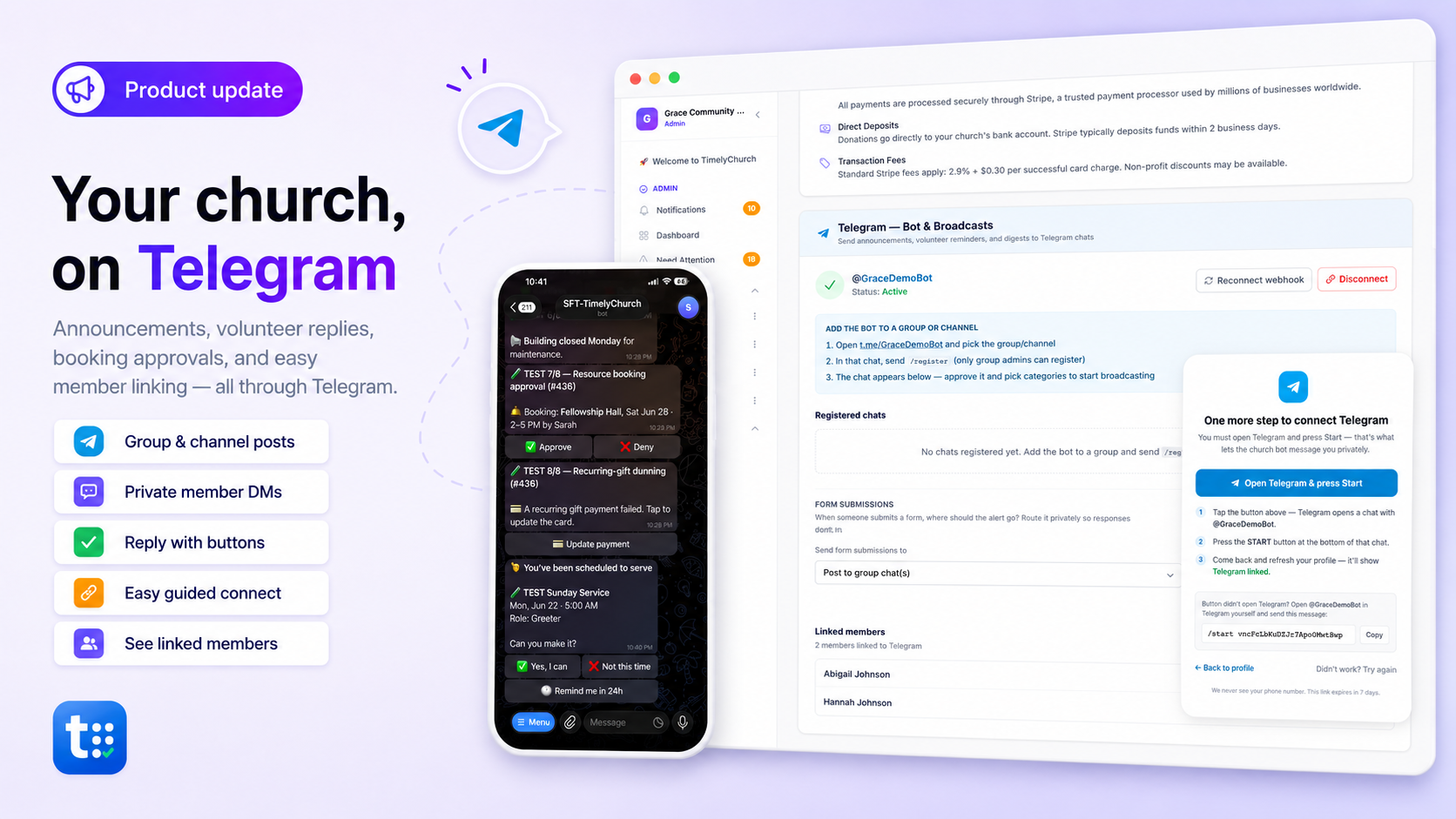
This is the heart of it: TimelyChurch broadcasts right into the Telegram group or channel your congregation already uses — so the whole church sees it, and nobody has to log into anything. You pick what gets posted: announcements (right away or scheduled), a weekly events digest and reminders, new sermons, Sunday service reminders, birthdays and anniversaries, prayer requests, new form submissions, and a daily verse of the day. Every category is opt-in, and everything goes out on your church's schedule, in your church's time zone.
Now: announcements can also go out privately
Not everyone sits in the church group chat — and some posts are for members only. So alongside the group broadcast, any member who connects their personal Telegram now gets announcements as a private message too. Target a post to one group and only that group's connected members are messaged; members-only announcements stay members-only. Group chat for the whole church, private DMs for the individuals who want them — you're covered both ways.
Volunteers can say yes or no — right inside Telegram
When you schedule someone to serve, they get a private message from the church bot with Yes, I can, Not this time, and Remind me in 24h buttons. One tap and their answer flows straight back into TimelyChurch — no login, no app-switching. For the people who keep your Sundays running, that's the difference between a reminder they ignore and one they act on.
Connecting is now a real, guided step
"Connect Telegram" used to just bounce you to the app and hope for the best. The catch: a bot can't message anyone until they press Start — and people didn't know to. So we built a proper walk-through: open the chat, press Start, done. There's a copy-and-paste backup if the button misbehaves, and the connection link now stays valid for a full week.
A friendly nudge so nobody misses out
If your church has the bot set up and a member hasn't connected yet, their dashboard now shows a gentle, dismissible reminder of what they'll get and how to turn it on. Dismiss it once and it stays gone.
Admins can see who's connected
In Settings → Integrations → Telegram, there's now a "Linked members" list — who's connected and when. Handy for knowing how much of your church you can reach this way, and who might need a hand getting set up.
🛠️ Fixes & smaller improvements
- Group-targeted announcements could quietly fail to notify anyone. A bug meant that whenever an announcement was aimed at specific groups, the notification step could error out silently — so the right people weren't told. Fixed; group-targeted announcements now reach exactly the members they should.
- Blocked-bot handling. If a member blocks the bot, we quietly stop trying and unlink them, so your sends stay clean.
💬 Keep the ideas coming
Everything we build starts with a church telling us what would help. If something's bugging you, slowing you down, or you wish it worked differently — or there's a language or feature your church needs — we want to hear it. We read every note.
We're here to help,
The TimelyChurch Team
Ready to try it?
If church announcements where your people already are (or the rest of church ops in one place) would help, you can start TimelyChurch free — up to 100 people — or begin a 30-day Pro trial. No credit card.