Sunday already has a system. Then the to-do list still lives somewhere else — a Trello board, an Asana project, a WhatsApp thread called “this week.”
That split is the pain. The event is in one place. Who prints the handouts, who unlocks the nursery, who texts the greeters is in another login the volunteer may never open.
You do not need a second task app for that. In TimelyChurch the work hangs off the event, and the people doing it have a place to see it.
Set up the event. That date is the hub.
From the admin sidebar, open Planning → Events. Click New event, or click the empty day on the calendar.
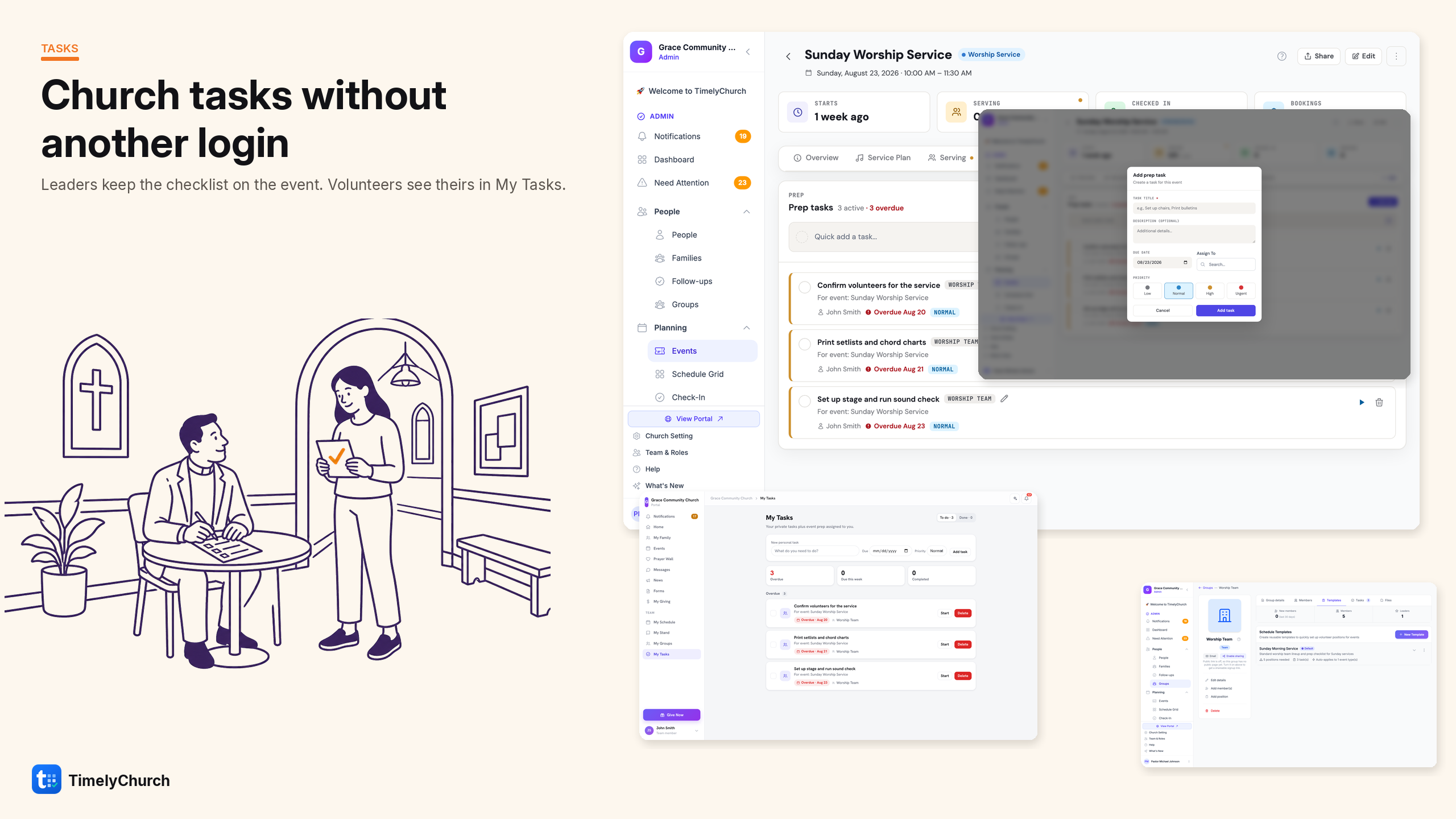
Leave Prep Tasks on in Capabilities — “To-dos before the day.” That is what puts the checklist on the event.
The event is the row. Everything that has to happen before it lives on that same record. You are not starting a project in another tool. You are opening the event you already created.
Leaders build the list and assign it
Open the event, then the Prep Tasks tab.
Click Add task. The modal is Add prep task. Task Title is the job (Print kids handouts, Unlock the nursery, Text the greeter team). Description is the note they actually need. Due Date is when it should be done. Assign To puts a person on it — someone who can sign in. Priority is there if you need it.
That is the whole leader move: build the list, put names on the rows. Staff can Start task and Complete right here.
Quick add a task... is the short path — title only, due date set to the event day, no assignee.
Do not put this on a person’s Notes & Tasks tab. That tab is pastoral notes and follow-ups. Wrong list. Wrong people looking at it.
Volunteers see it in My Tasks
They should not need the admin panel.
Once you Assign To them on the event, it shows in My Tasks in the Member Portal — To do and Done, grouped Overdue, This week, and Later. They Start and Complete there. They only see what is theirs.
Admin view: you add the work on the event. Member view: they see the jobs assigned to them.
What this is, and what it is not
This is church task management in the same login as Sunday: an event, a list, a name, a due date.
My Tasks is a list, not a Kanban board. TimelyChurch does not publish to Instagram. There is no photo card on the task. If you are running a Christmas production with columns and dependencies, keep the project tool for that.
If the hole was “who is doing what before this event,” you do not need a third login. Put the task on the event. Assign it. They will see it in My Tasks.
Ready to try it?
If hanging Sunday prep on the event (or the rest of church ops in one place) would help, you can start TimelyChurch free — up to 100 people — or begin a 30-day Pro trial. No credit card.