Ask a worship leader what the hardest part of the job is and almost nobody says the music.
They say the chasing. Chasing charts into a group chat. Chasing down who has last week's printout. Chasing a key change that happened on Wednesday and never reached the bass player. And under all of it, the question that keeps you up on Saturday night and that no tool has ever been able to answer: does the band actually know these songs?
Worship in TimelyChurch is now complete, and it was built around that week — not around a feature list. Here's what it actually looks like, day by day.
🗓️ Monday — the leader plans
You open Worship → Song Library. Every song your church sings is in there with its key, tempo, time signature, chord chart, and lyrics, tagged the way you think about them — Christmas, communion, opener, "songs our congregation actually sings." Filter, find, done.
Pull the songs you want into a new setlist, drag them into the order you'll play them, and set each song's key right there in the list. Click a song and a chart preview slides open beside it — transpose it up or down to hear where it sits, check the tempo and meter, pick which arrangement you want (the full-band chart or the acoustic one), add a capo, and leave a note for whoever's playing it.
While you're building, the total run time adds itself up. It sounds small. It isn't. Knowing your set runs 24 minutes on Monday is a very different experience than discovering it on Sunday.
Then you set Thursday's rehearsal — time and place — and you're done. The whole thing took about five minutes, and it's now in one place instead of five.
🎧 Midweek — a player practices
Your bass player has twenty minutes on a Tuesday evening. She opens the set on her phone.
Each song has its own card. If someone's uploaded a reference recording — a rough phone demo, the studio version, last week's live mix — there's a player built right into the card. She hits play, drops an A–B loop around the bridge she keeps fumbling, and slows it to 0.5× while she works out the walk-down. Then back up to tempo.
When a song sticks, she marks it learned. She jots a private practice note on another one — "count myself in, don't wait for the click" — that only she will ever see. And she RSVPs for Thursday.
That took her twenty minutes and no group chat.
✅ Saturday — the leader checks
This is the part no other worship tool does, and it's the reason we built the module the way we did.
You open the set's readiness panel. There's a team readiness percentage and, under it, who has learned what. Six of your seven players are green. Your new bass player has marked everything except the closer.
That's one text message on Saturday afternoon — "hey, want to run the closer once before the service?" — instead of a guess, a shrug, and a rough first verse in front of the room.
You are not managing people harder. You just stopped operating blind.
🎸 Sunday morning — everyone plays
Nobody prints anything.
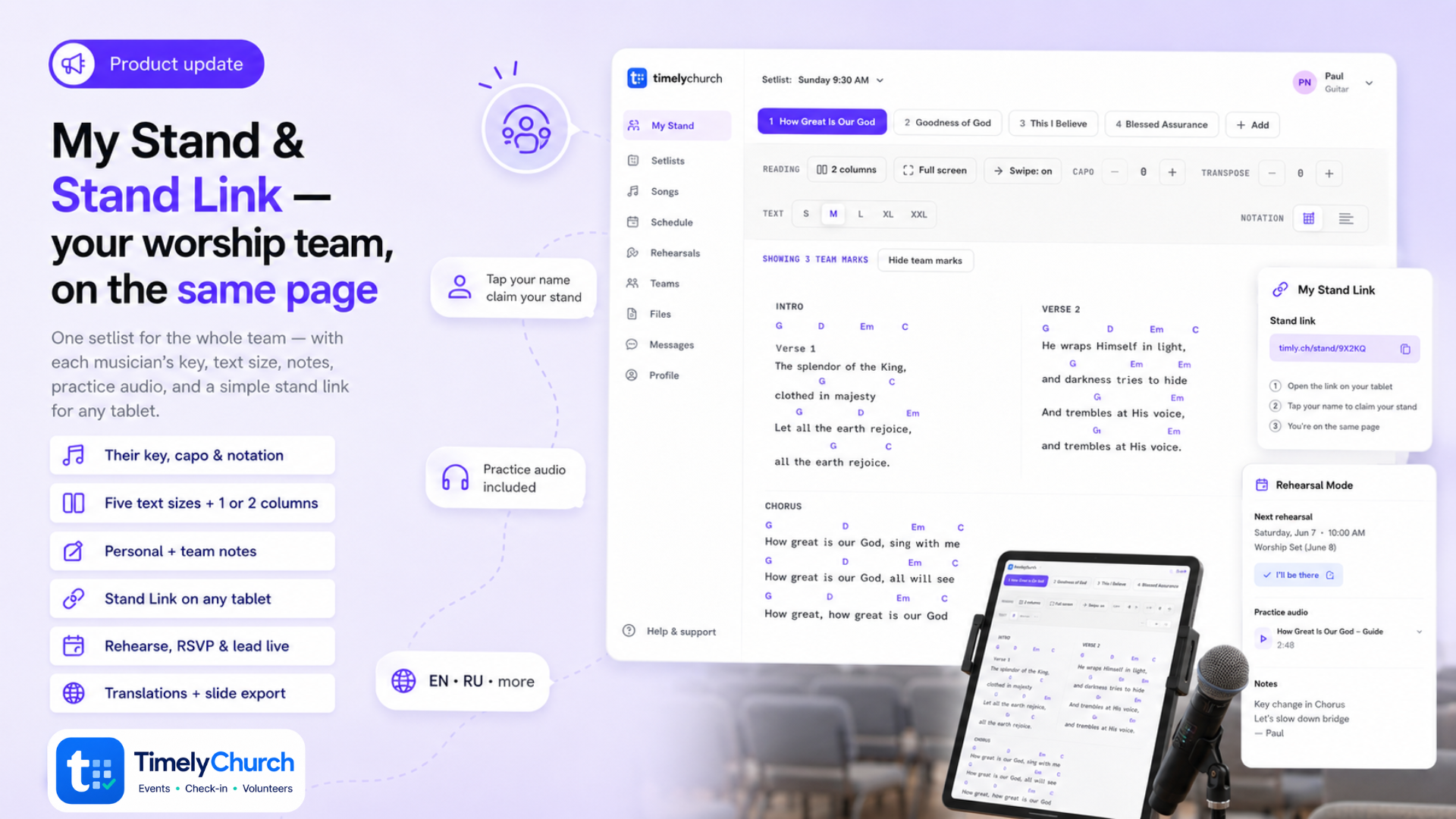
Each player opens My Stand on their own phone or tablet. It's dark, high-contrast, and built for a stage: the chart rendered clean, the song's key, tempo, and meter in the header, and nothing else competing for your eyes.
And here's the bit that quietly solves years of arguments — every player reads it their own way, from the same set:
- Your guitarist puts a capo on 2 and reads C shapes.
- Your vocalist transposes down a tone into her key.
- Your keys player switches to Nashville numbers.
- Your drummer bumps the text size up so he can read it from behind the kit.
None of them affect anybody else. There is no "master copy" that somebody has to be wrong about.
Built into the stand: a metronome, autoscroll so your hands can stay on the instrument, keep-screen-awake so it doesn't go dark mid-song, and foot-pedal keys if you use one.
Your own highlights and notes show as colored labels right on the chart while you play — private by default. If you choose to share a mark with the team, it appears on everyone else's chart as a read-only overlay with your initials on it, never overwriting theirs.
Then you tap Go Live. Every stand in the room follows the song you're on. When you skip the third verse and jump to the bridge, every screen goes with you — while each player keeps their own key, capo, and notation. Nobody looks up. Nobody flips a page in the wrong direction.
(One honest note: this is instant when your church has realtime turned on. Without it, the stands still follow — they just check in every few seconds instead. Either way it works, and there's nothing to configure.)
📊 After the service — the paperwork is already done
Open the usage report, pick a date range, and there it is: which songs you sang, how many times, and the key you most often played them in. Plus a list of songs still missing a CCLI number, so your reporting doesn't stall on a blank field. Export the CSV and you're finished.
📋 What's included — the short version
For skimmers, here's the whole module in one list:
- Song Library — key, tempo, time signature, ChordPro chart, lyrics, themes and tags, CCLI number, approval status, and filters that find things fast.
- Arrangements — one song holds many versions (full band, acoustic, the easier key for a new singer). Chords and lyrics live on the arrangement, lyrics derive automatically from the chart, and you can start a new arrangement by duplicating an existing one. Click one to preview its chart in a popup. A section sequence strip (Verse 1 · Chorus · Bridge) rides along the top of charts and PDFs.
- Setlists — drag-and-drop order, per-song key, arrangement, capo and notes, a chart-preview drawer with transpose, and a running total time.
- My Stand — the dark stage reader on every player's own device: transpose, capo, letters or Nashville numbers, text size, metronome, autoscroll, keep-screen-awake, foot-pedal keys.
- Annotations — private highlights and notes rendered inline on the chart, optional team sharing as a read-only initialed overlay, and print the whole set with your marks on it.
- Practice audio — attach a reference recording; players get an inline player with A–B section looping and 0.5×–1.5× speed.
- Rehearsal readiness — set the rehearsal, players mark songs learned and RSVP, the leader watches a live team-ready percentage.
- Go Live — the leader (or a co-leader) starts a live set and every stand follows the current song.
- Chart PDFs — a real header with key, capo, BPM and meter, chords that never split from their lyric across a page break, smart one- or two-column layout, a footer with copyright, CCLI and page numbers, and printer-friendly ink.
- Exports — chord chart PDF, lyrics-only, Nashville numbers, all keys, plus ProPresenter and PowerPoint for the booth.
- Usage & CCLI reporting — per-song usage over any date range with the top key, a missing-CCLI list, and CSV export.
- Service plans — load a setlist straight into a worship event's order of service.
Where to start
Don't try to move your whole catalogue in one sitting. Open Worship → Song Library, add this Sunday's songs, build the set, and send your team the link. That's it — about five minutes.
By Thursday you'll know whether they've learned it. That alone changes the shape of your Saturday.
👉 Tell us what's getting in your way
Ready to try it?
If Worship that carries the whole week (or the rest of church ops in one place) would help, you can start TimelyChurch free — up to 100 people — or begin a 30-day Pro trial. No credit card.